

Your desk is working against you, and the fix costs less than a dinner out.
By late summer, most people's spending energy is tapped. Back-to-school season just ran through the budget, vacation receipts are still clearing, and the last thing anyone wants is another big purchase to justify. But here's the thing about your workspace: a few targeted upgrades can genuinely change how productive and comfortable you feel every day, and you don't need to spend hundreds to get there. Under $50, you can clear the clutter, reclaim desk space, and set yourself up for a much better fall season. Here's where to start.
Why Small Desk Upgrades Actually Matter
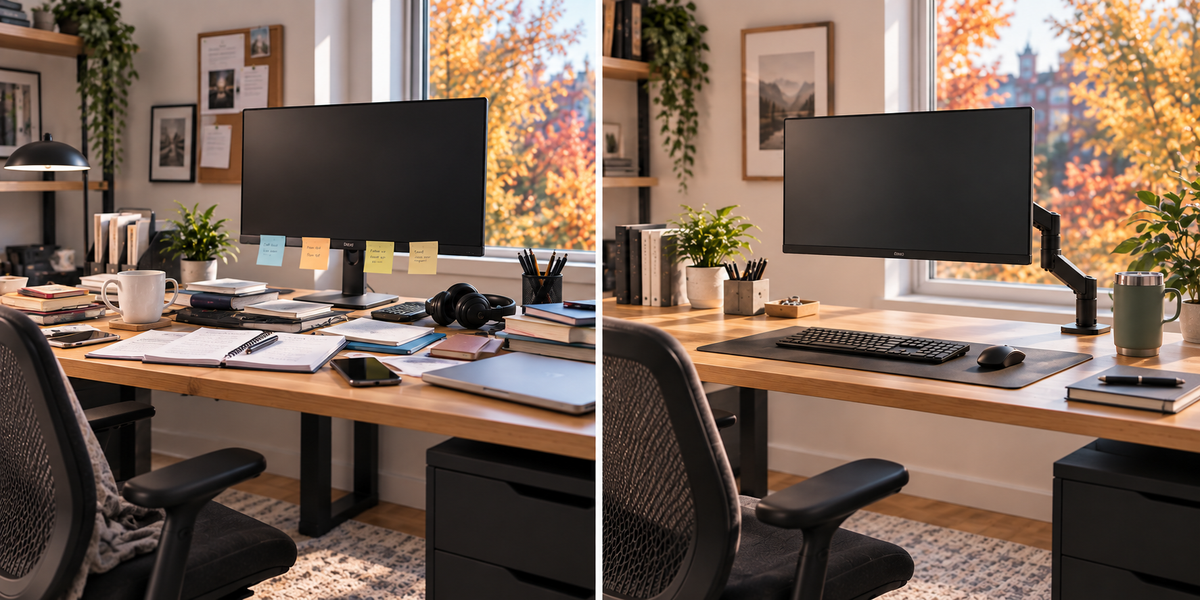
It sounds like marketing talk until you try it, but the physical state of your workspace has a direct effect on your focus and energy. A cluttered surface creates mental noise. A monitor sitting flat on a desk instead of at eye level puts strain on your neck over hours of use. Cables tangled across your work area make everything feel messier than it needs to be. None of these are problems that require a full office remodel to fix. The right accessories, even inexpensive ones, can take a frustrating setup and make it feel intentional and functional. That's the goal here.
Mount Your Monitor, Free Your Desk
If you're still using the stand your monitor shipped with, you're leaving real estate on the table. A single monitor arm lifts your screen to eye level, reduces neck strain during long sessions, and opens up the entire footprint beneath your monitor for a keyboard, notebook, or just breathing room. VIVO's STAND-V001 fits most screens from 13" to 38", clamps directly to your desk without any drilling, and comes in under $40. You get full tilt, swivel, rotation, and height adjustment, and setup takes about 15 minutes. For anyone running a laptop alongside an external monitor, pairing a laptop tray attachment with a single arm gets both screens off the surface entirely and keeps things clean without the extra cost of a second mount.
Tame the Cable Situation
Cable chaos is one of the most common complaints about home office setups and one of the easiest to solve. Once power strips, charging cables, and monitor cords are contained and routed out of view, a desk transforms. It's not just visual; not tripping over a cable or accidentally unplugging something during a video call has real practical value. VIVO's DESK-AC16F-S cable management tray fits a standard power strip and up to six cables, keeps everything enclosed, and screws neatly under your desk for under $30. For a cleaner wall or desk-edge run, VIVO's vertebrae cable management kits (DESK-AC01C) let you route cables out of sight without exposed wires, and most options land between $30 and $35, making cable management one of the most cost-effective upgrades on this entire list.
Add a Shelf, Gain a Second Surface
A desk shelf is one of those upgrades that takes about five seconds to appreciate once it's in place, and there are a few different ways to go about it depending on how your workspace is set up. If you want to add vertical storage above your desk surface, the STAND-SHELF2C Above/Below Clamp-on Dual Shelf gives you two tiers of storage starting at $50, with a reversible clamp design that lets you mount it above or below the tabletop. It holds up to 11 lbs across both shelves and comes in three sizes (13", 24", and 30"), so it scales to whatever your desk can accommodate. For something more flexible, the DESK-SHELF15B Clamp-on Versatile Desktop Shelf Riser starting at $40 gives you three assembly options: clamp it inward as a monitor or laptop riser, clamp it outward as a desk extension, or set it up freestanding if you'd rather not attach it at all. It handles up to 44 lbs and works with desktops anywhere from 0.4" to 2.8" thick, which covers most standard setups. If reclaiming actual desk surface is the priority and you'd rather keep storage hidden, the DESK-SHELF30-UB 30" Under Desk Shelf for $50 mounts to the underside of your desktop and keeps supplies, electronics, and books within reach without taking up any usable space above. It holds 44 lbs and has a built-in safety ledge to keep items from sliding. Any one of these gets the job done, depending on your preference, and all three land right at or under $50.
Ergonomic Accessories That Don't Break the Budget
Ergonomics isn't just a corporate buzzword. When you're sitting at a desk for six to eight hours, your posture, wrist position, and eye level genuinely affect how you feel at the end of the day. The good news is that meaningful ergonomic improvements don't have to come from expensive chairs or full standing desks. For laptop users, VIVO's STAND-V001N laptop stand brings your screen up to a healthier viewing angle and pairs naturally with an external keyboard and mouse at desk level. Ours is priced at $30 and is easy to move between home, a coffee shop, or a co-working space. Combined with a monitor arm for anyone running a full desktop setup, these small positioning changes add up quickly in terms of how you feel after a long day.
Stack Your Upgrades, Not Your Spending
The real advantage of focusing on accessories under $50 is that you can make meaningful progress on your setup without committing to a single large purchase. A monitor arm, a cable tray, and a desk shelf can completely change how your workspace looks and functions, and you can grab all three for less than the cost of most mid-range office accessories. A good approach when working with a tight budget: prioritize the one change that bothers you most. If cables are the problem, start there. If your neck aches after a long day, a monitor arm should be the first move. If you simply don't have enough surface space to work, a riser gets you there fast. Small problems require targeted fixes, not a complete overhaul.
The Setup You Want Is Closer Than You Think
End of summer doesn't have to mean putting off a better workspace until the next budget cycle. The upgrades that make the biggest difference on a daily basis are often the most straightforward ones, and at under $50, they're accessible whether you're a student settling into a dorm room, a remote worker tightening up a home office, or someone who just wants their desk to stop stressing them out.
Start with one change. You'll probably want to make another one shortly after.

Share:
Neck Pain, Eye Strain, and Slumped Posture: What Your Desk Is Doing to Your Body
Long Weekend, Clean Desk: A Labor Day Home Office Refresh Guide